
AI Decks That Follow Your Company Master
Import one PowerPoint deck built on your company master, and every deck the Slaide agent writes after that follows it: your fonts, your colours, your layouts, checked slide by slide. Free to start.
Every company has a PowerPoint master. Fonts, colours, the logo in the corner, the twelve layouts someone in marketing built three years ago. And every AI slide tool ignores it. You get a nice deck in somebody else’s design, and then you spend the afternoon dragging it into yours.
Slaide works the other way round. Your master comes first, and the AI writes into it.
Import your master, free Why it stays on-brand
Three steps to your master
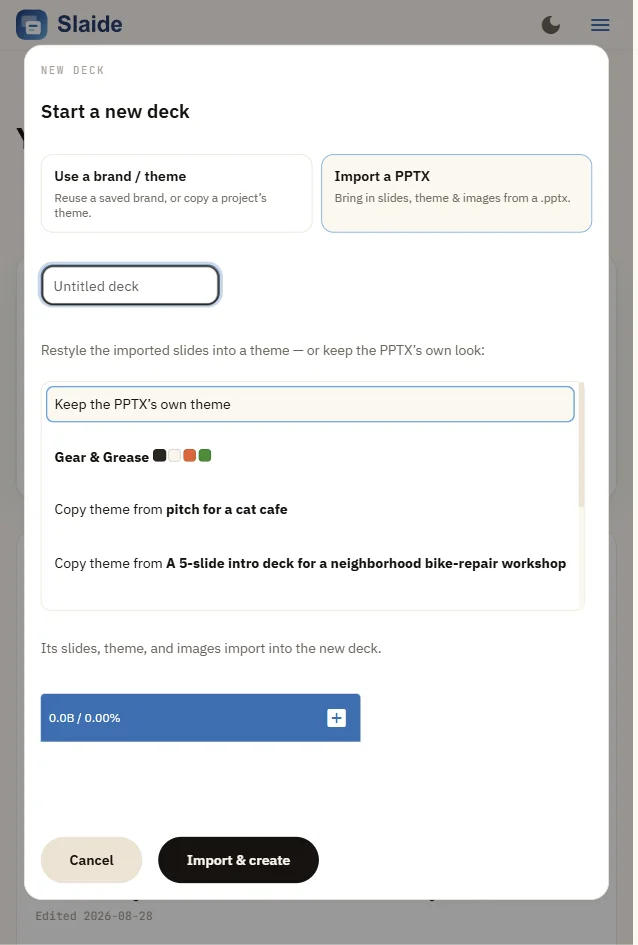
- Import one deck built on it. In the web app, press New deck, choose Import a PPTX, and keep the PPTX’s own theme. A real deck works better than an empty template, because it shows how your layouts are actually used. Slides, theme and images come across.
- Start every new deck from it. Next time choose Use a brand / theme and copy the theme of that imported deck. The fonts, colours, logo and layouts are now the starting point.
- Let the agent write. Tell it the topic. It writes into your layouts and slots, checks every slide against them, looks at its own render, and fixes what is off. Export to PowerPoint when you are done.
Why a chat AI cannot follow your master
A chat assistant that writes a .pptx file writes raw slide XML. It has no idea what your layouts are called, which placeholder holds the subtitle, or where the logo goes. It guesses, nobody checks the guess, and the guess shows.
Slaide gives the agent the master before it writes a single line:
- Your master is a file the agent reads. Fonts, colours, the logo, and every layout with its named slots. The agent writes into those slots instead of placing boxes on a blank slide.
- Every draft is checked against it.
slaide validate --strictfails on any layout, slot or colour name your master does not have, and says which line. A deck that does not fit your master does not pass. - The agent looks at its own slides.
slaide shoot --montagerenders every slide into one image that the agent reads back, so it catches clipped text, poor contrast and overflow before you do. - It loops until the deck is clean. Write, check, look, fix. Then
slaide export --pptxhands you a PowerPoint file with real, editable text boxes.
That loop is the harness. It runs in the Slaide app, and in Claude Code, Codex and Gemini through the Slaide agent skill and MCP server. The model is the same model everyone has. The harness is what makes it stay inside your master.
For teams that work in a repo
The master is a plain text theme file, so it can live next to your code:
The first line turns your deck into a Slaide deck plus a generated theme. The second installs the agent skill and MCP server for your coding agent. From then on, every deck it writes is validated against that theme. Tidy the generated theme once, naming the layouts the way your team talks about them, and commit it.
Set your expectations
What you get
- Your master as a Slaide theme, built from your own deck.
- AI decks written into your layouts and checked against them, slide by slide.
- PowerPoint export with editable text, for colleagues who never leave PowerPoint.
What you do not get
- A pixel-perfect copy of every hand-placed decoration. Bespoke animations and one-off shapes flatten on the way through.
- Your own fonts in the export, unless they are on Google Fonts. Other fonts are flagged, and PowerPoint substitutes them.
- A .potx template import. Start from a deck built on your master.
What it costs
The Slaide core is open source under Apache-2.0: the renderer, the CLI, the MCP server, the agent skill, and .pptx import and export. The editor is free on desktop, web and iPhone, and your first AI deck is free. Hosted is $9.90 a month or $99 a year for 10 AI decks a month, cloud sync and sharing. Details are in pricing. Buying for a team through Microsoft? Slaide is on Azure Marketplace, billed on your Azure invoice.
The full import options are in the import docs. Rehearsing the talk afterwards is the Slaide Coach.